
Guides
Reading the MyHissab dashboard: collected revenue, estimated IFU and cap gauges
Every dashboard indicator explained: collected revenue, estimated IFU, the cap gauge and its two readings (collected and invoiced), real margin, annual summary, and a five-minute monthly routine.
By the MyHissab team 9 min read
The MyHissab dashboard brings together, for the current calendar year, the figures an auto-entrepreneur needs to know: what they have collected, how much IFU that represents, where they stand against their cap, and what is left once expenses are paid. This guide explains what each indicator measures, what it does not measure, and suggests a five-minute monthly routine. By the end, you will be able to read the page at a glance and prepare your tax return without re-entering anything.
The indicators in one table
All figures relate to the calendar year, from 1 January to 31 December, like the revenue cap and the IFU.
| Indicator | What it measures | When to use it |
|---|---|---|
| Collected revenue for the year | Sum of payments recorded on your invoices, credit notes deducted | Every month; it is the practical basis of your IFU |
| Estimated IFU | 0.5% of collected revenue | To set aside the amount to be paid |
| Cap gauge on collected revenue | Collected revenue as a share of your field's cap | To track the IFU basis |
| Reading on invoiced revenue, below the gauge | Invoiced revenue as a share of the same cap | To measure the risk of losing the status |
| Expenses for the year | Total of expenses entered | To know your real costs |
| Real margin | Collected revenue − expenses | To know what the activity really brings in |
| Overpayments to refund | Credit notes issued after a payment, all years combined | To refund the client without forgetting |
| CSV export and annual PDF summary | CSV: the four headline indicators and the latest invoices; PDF: receipts month by month and the IFU | For the tax return, the accountant, the archives |
Collected revenue and estimated IFU
The first figure is collected revenue: only the payments you have recorded from your invoices, at their payment date. An invoice that has been issued but not paid does not appear there. A deposit that has been invoiced and paid is counted at its date. A credit note issued is deducted.
The estimated IFU applies the 0.5% rate to this amount. It is a management estimate, not a tax return: the rate is that of the final flat tax under law no. 22-23, but the procedures for declaring and paying are set by the DGI, the only reliable source for the calendar. The details of the calculation are in the 0.5% IFU guide.
Example of a year
Amine Kaci, a developer in Algiers (field 020000, digital services), is subject to the 5,000,000 DZD cap. As at 30 September, his receipts for the year break down as follows:
| Month | Collected |
|---|---|
| January | 250,000 DZD |
| February | 300,000 DZD |
| March | 400,000 DZD |
| April | 350,000 DZD |
| May | 450,000 DZD |
| June | 400,000 DZD |
| July | 500,000 DZD |
| August | 350,000 DZD |
| September | 600,000 DZD |
| Total | 3,600,000 DZD |
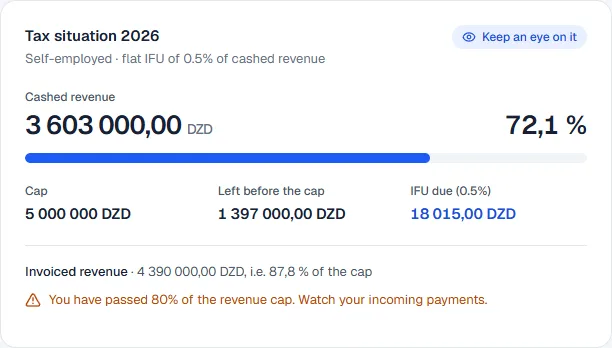
His dashboard therefore shows collected revenue of 3,600,000 DZD, an estimated IFU of 18,000 DZD (3,600,000 × 0.5%) and a gauge on collected revenue at 72% (3,600,000 / 5,000,000). He has 1,400,000 DZD of headroom before the cap, for three months of activity.
The cap gauge and its two readings
The annual cap is 5,000,000 DZD for the seven service fields and 10,000,000 DZD for micro-import; MyHissab uses the one for your ANAE field. A single gauge tracks it, with two readings, because two different figures matter.
- The reading on collected revenue, the progress bar, tracks the basis of your IFU. It rises when a payment is recorded.
- The reading on invoiced revenue, shown below the bar with its own percentage, tracks your commercial activity: all of the year's invoices that have not been cancelled, including drafts, paid or not. This is the one that measures the risk of exceeding the cap, because a pending invoice will one day be collected.
In Amine's example, 500,000 DZD of issued invoices have not yet been paid. His reading on invoiced revenue stands at 4,100,000 / 5,000,000, or 82%: the 80% alert appears, while the bar on collected revenue remains at 72%. That is exactly the information he needs to decide whether to accept another large order before the end of the year.
An alert appears as soon as collected or invoiced revenue reaches 80% of the cap, followed by an exceeded message at 100%. The bar on collected revenue also carries a badge: Keep an eye on it (70%), Close to the cap (80%), Cap exceeded (100%). Exceeding the cap causes no blocking in the application and does not trigger an immediate penalty; it is the signal that the status is no longer suited to your volume of activity. MyHissab's loss-of-status alert only triggers after three consecutive calendar years of exceeding the cap: this is an alert setting, not a rule of law. As you approach the cap, the Auto-entrepreneur cap guide and the ANAE remain the references.
Expenses and real margin
The expenses entered in the Expenses menu (label, date, amount, category, payment method, reference) feed two indicators: the total expenses for the year and the real margin, that is, collected revenue minus expenses.
One point to remember: expenses do not reduce the IFU. The regime is flat-rate; the rate applies to gross revenue. If Amine spent 1,250,000 DZD during the year (equipment, subscriptions, travel), his real margin is 2,350,000 DZD, but his estimated IFU stays at 18,000 DZD. The real margin is for you, not for the tax office: it tells you whether the activity is profitable and whether a price needs revising. The Expenses and real margin guide covers data entry in detail.
Why an indicator sometimes shows a link rather than a figure
As long as one term of the calculation is empty, the indicator does not show an amount but an explicit state: "No payment recorded this year.", "No expense recorded this year." or "No invoice issued this year.", with a link to the screen where the missing data can be entered ("Record a payment", "Record an expense", "Create an invoice").
The reason is simple: an empty term would give a wrong figure. If you have entered 300,000 DZD of expenses but no payment, a calculated margin would show −300,000 DZD, whereas you may have collected far more without recording it. Likewise, a gauge at 0% would suggest the cap is a long way off. A link is better than a misleading figure. When you see this state, follow the link and record what is missing; the method is described in Recording a payment.
Credit notes and overpayments
An issued invoice cannot be modified: it is corrected by a credit note. The credit note is deducted from collected revenue and from the estimated IFU, which avoids paying tax on a sum that was ultimately cancelled.
If the credit note is issued after the client has paid, the dashboard flags an overpayment to refund. Example: an invoice of 200,000 DZD paid by bank transfer, then a credit note of 50,000 DZD for a service not delivered. Collected revenue falls back to 150,000 DZD, and 50,000 DZD appears as an overpayment until the refund is made. The full procedure is in Credit note and invoice cancellation.
CSV export and annual PDF summary
Two exports complete the page.
- The CSV export takes the four headline indicators (collected revenue, outstanding, expenses, margin) and your last five invoices; the annual PDF summary gives the month by month and the IFU. The CSV file opens in any spreadsheet, handy to pass on to an accountant or to keep with your archives.
- The annual PDF summary presents collected revenue month by month and the corresponding IFU. It is the document to have in front of you when preparing your tax return, together with your numbered invoices and your proof of receipts. It does not replace the return itself, whose form and calendar are set by the DGI.
Download both files at least once at the end of the year and keep them with a full backup of your account.
The five-minute monthly routine
- Record the payments received during the month, with your bank statement or deposit receipts in front of you, with the right date and the right method (the stamp duty is calculated automatically for cash).
- Enter the month's expenses, keeping the receipts.
- Check that no indicator shows "No payment recorded this year." or "No expense recorded this year.": if one does, some data is missing.
- Read both readings of the gauge. The gap between invoiced and collected corresponds to your pending invoices: this is the time to send reminders.
- Note the estimated IFU and set the sum aside, so as not to discover it when it is time to declare.
- In December, download the annual PDF summary and the CSV export, then check that the last invoice of the year does carry a date within the year.
Common mistakes
- Confusing invoiced and collected. Invoiced measures activity and the cap risk; collected is the IFU basis. Reading only one of the two readings means getting it wrong one way or the other.
- Forgetting credit notes. A client refunded without a credit note leaves collected revenue and the estimated IFU too high. Issue the credit note from the invoice, never by modifying it.
- Entering expenses "to lower the tax". They change nothing about the IFU. Enter them to know your margin, not for anything else.
- Recording a payment on the wrong date. A payment received on 3 January and dated 28 December changes calendar year, and therefore cap and IFU.
- Waiting until December. Twelve months of entries in one go is the surest way to forget a cash receipt.
Frequently asked questions
Does the dashboard replace the IFU return? No. It gives an estimate at 0.5% of collected revenue and a summary to prepare it. The return and the payment are made with the tax administration, according to the procedures and calendar set by the DGI.
Why has my estimated IFU gone down when I have not deleted any invoice? Most often because a credit note has been issued: it is deducted from collected revenue, and therefore from the estimated IFU. Check the Credit notes menu and, if a client had already paid, the overpayments-to-refund indicator.
What happens if the gauge goes above 100%? Nothing is blocked: you can keep invoicing and recording payments. The alert tells you that the annual cap has been crossed and that the status is no longer suited to your volume. Get in touch with the ANAE about what comes next; the application does not decide that question for you.
This information is provided for practical purposes and reflects the texts in force on the update date. It does not replace advice from the ANAE, the tax administration or a professional. Always check the latest version of the official texts.
From theory to your first invoice.
MyHissab applies these rules automatically: legal mention, amount in words, revenue caps. Free, no credit card.